
 Diane
Diane
It’s not yet official, but sources including MacRumors.com state that Apple was planning to change its serial number to a randomized alphanumeric format. This according to an internal memo shared with Apple Authorized Service Providers. The changes to the serial numbers are scheduled to be introduced starting later this year.
Should you be concerned?
For brand new Apple product buyers, this should really be no cause for concern. Especially if you’re buying from a legitimate Apple store or certified Apple distributor. In fact, I’ve got a MacBook Air that’s almost three years old and I don’t remember being genuinely concerned about my serial number or having to look it up for any reason.
Where can you find your Apple serial number?
For iPad, iPad touch, and iPhone users, the serial number or IMEI (International Mobile Equipment Identity) can be located on:
- Original packaging
- Physical device (SIM tray on iPhone)
- Finder or iTunes
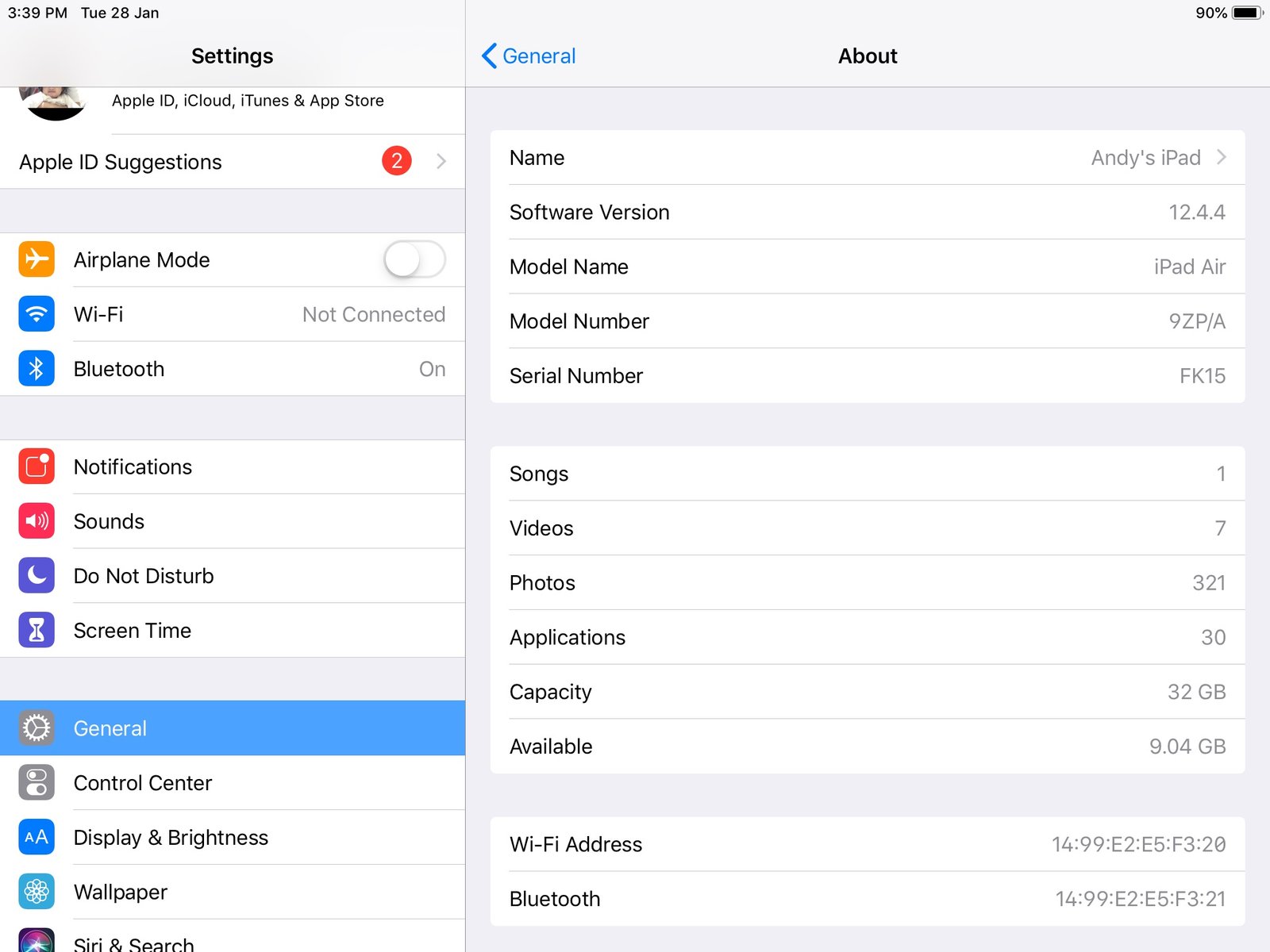
- Settings
To check your serial number using “Settings”
- Step1. Go to Settings
- Step2. Click General
- Step3. Click About
For MacBook users, your serial number can be found in three locations:
- On the bottom of the back surface of the MacBook
- Barcode label of the original packaging
- Locate the Apple menu in the corner of your screen, choose About This Mac
- Checking the System Information app. To open this directly, press and hold the Option key and choose Apple menu then System Information
What does your Apple Serial Number tell you?
- Warranty status of your device
- Tells you the date and where it was manufactured
- By knowing the exact model, it makes it easier for you to find replacement parts
- It can tell you if the product is genuine
The danger of Fake Macs and Other Apple Devices
There’s a good chance that this would be the first time that you hear that there are fake Macs out there. But this would only be a problem when you’re buying a secondhand mac or trying to get a bargain from an unauthorized Apple retailer.
Is this even possible? If you come to think of it, MacBooks are laptops. And each laptop or desktop computer contains similar basic components (processor, storage device, memory, display devices). What makes Apple products, or any well-engineered laptop better than the competition is how well a manufacturer brings similar components together. If you’re still having a hard time wrapping your head around this thought, you can check out this article.
How to check if your Mac is legit?
If you find yourself asking this question, there’s a pretty good chance that you’re shopping for a used MacBook or iPhone. Good thing we’ve also got some Refurbished Macs – buying tips. So, you might want to check this out first.
When shopping for a MacBook or iPhone online, getting a hold of the serial number is critical. MacBook serial numbers for example tells you the model. With this, you can now confirm if the product details being shown in the ad is identical to the original product description (processor, display type, storage).
Here at Techable, we have created an easy way for you to check Mac’s specifications by simply entering the serial number. You can visit this link to our Decode Apple Serial Number to learn all about your Mac’s specs, part numbers, processor details, and pricing guide for your Mac.
Why Make Changes?
If true, Apple has yet to make the official announcement to the public. But this information has already generated many questions and reactions. Some say that the existing serial number format makes it easier for anybody to understand important information such as the manufacturing location, production date, and model. So, why make the changes?

 Ronald Uy
 Leah H. Blanchard


 Adrienne Blanier


0 Comments