
 Diane
Diane
Laptops are not only designed to be portable but should also be able to operate anywhere for long periods of time unplugged from a power source. After all, there’s no use bringing a laptop if you’re constantly checking your MacBook battery and searching for the nearest outlet.
One of the most ubiquitous places we see laptops are coffee shops. How many times have you seen people searching for a seat near an outlet? However, even with the best care practices, batteries are simply not made to last forever. The problem is that most of us are not aware of the problem unless its already time to replace the battery.
How to Check Battery Life
Simply locate the battery icon on the menu bar.

Not exactly the result I was hoping for, but my MacBook Pro has been around for 4 years so it really was not that surprising. Age certainly plays a major role in battery life but usage also takes a huge chunk of your battery life.
Depending on your battery’s condition, here are the results:
- Normal: The battery is functioning optimally.
- Replace Soon: The battery is functioning normally but has a shorter battery life than it did when it was new.
- Replace Now: The battery is functioning normally but holds ‘significantly’ shorter battery life than it did when it was new. You can continue to use the battery until you replace it without harming your computer.
- Service Battery: The battery isn’t functioning normally, and you may or may not notice a change in its behavior or the amount of charge it holds. This battery may also indicate “service” when the battery drops below 80% original capacity. Generally, there’s nothing that needs to be done with a “service” battery other than replace it. You can continue to use your battery before it’s checked without harming your computer.
Battery Cycles and What Does it Mean
To get a more accurate idea on the condition of your Mac battery, check for cycle count. It is estimated that batteries can last up to 1,000 cycles. One cycle count simply means using all your battery power and then recharging it. So, a battery with a 500 cycle count means the battery has been fully drained and charged 500 times.
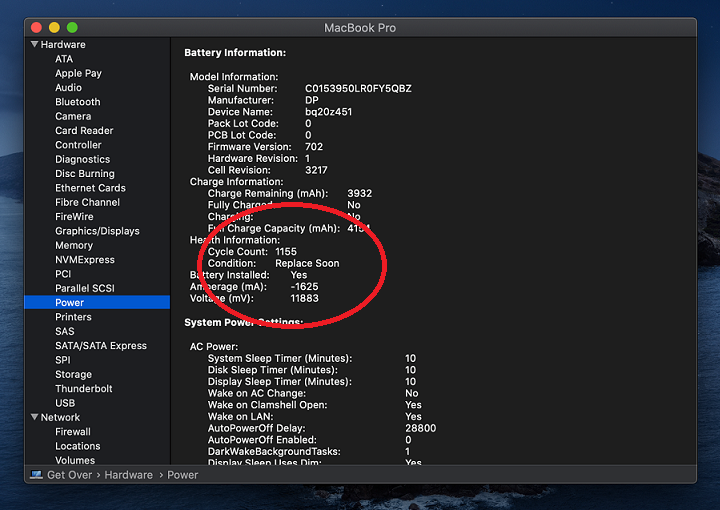
Apple estimates that its batteries are designed to retain up to 80 percent of its maximum charge at 1,000 cycles. So, you can expect a steady deterioration beyond 1,000 cycles.
Your typical laptop battery should be good for about two to four years, or around 1,000 full charges – which is exactly what my MacBook Pro 2015’s battery is telling me right now (1155 cycles). There are several factors you should consider, the battery type (Li-on, NiMH, or NiCad), battery’s age, and how often it is used.
Signs of a Failing Battery
Check Battery Status
As shown above, the easiest way to check the state of your battery is to locate the battery icon in your top menu bar and simply click it. If the result show you ‘Replace Now’ or ‘Service Now,’ then you should replace the battery.
Shorter Operating Times
Remember those times when you could watch your favorite movies and surf the internet without having to worry about recharging? Much of it still depends on how you use your laptop. But give it some time and eventually, you would notice a steady drop in battery performance. Before you go pointing at a dying battery, there are a few things you should consider why your battery is not holding up as expected.
What Affects Battery Life on Laptops?
1. Screen brightness
2. Power-hungry apps
3. The number of programs running simultaneously
4. Wi-Fi and Bluetooth connections
5. Connected devices
Abnormal Heating
Although overheating is due to several hardware factors, a failing battery can be one of the culprits. If you find your laptop to be hotter than usual even when your using it for simple tasks, then having it checked wouldn’t hurt.
Replacing your Batteries – A Word of Caution
All MacBook, MacBook Air, and MacBook Pro with built-in batteries – no exceptions, should only be serviced by an Apple Authorized Service Provider, Apple Retail Store, or professional repair service provider. Any attempt to replace a built-in battery can damage your hardware and void your warranty. Below is a list of Apple laptops with built-in batteries:
- MacBook (13-inch, Late 2009) and later
- MacBook (Retina, 12-inch, Early 2015) and later
- All MacBook Air computers
- All MacBook Pro computers with Retina display
- MacBook Pro (13-inch, Mid 2009) and later; MacBook Pro (15-inch, Mid 2009) and later
One of the things we often overlook when purchasing a refurbished MacBook is the health of the battery. When shopping for a refurbished MacBook, be sure to take a look into how much battery juice it can hold to avoid the additional cost of buying a new one.

 Ronald Uy
 Leah H. Blanchard



 Adrienne Blanier


0 Comments